

Posts

Update from 2021-12-20: information about additional vulnerabilities found for Log4j can be found here.


Update from 2021-12-20: vulnerability tests for products running on Microsoft Windows are now available.

Note: The tests check the existence of Log4j and its version. A separate vulnerability test may not be available for each affected application, but all Log4j files are found and reported (/path-to-log4j-file/).

The issued installation paths must be checked and, if necessary, the vendor must be contacted. It must be checked whether updates are already available for the respective application and whether the find is relevant.

PowerShell execution privileges on a target system are required for the account used in an authenticated scan. Some vulnerability tests execute PowerShell commands to increase the accuracy of the results, which require permissions for the duration of a scan.


Update from 2021-12-15: an additional attack vector was identified and reported in CVE-2021-45046. We are working on vulnerability tests for this vector, although our tests are working for this additional case too. We recommend to update to the latest Log4j version. The attack is more complicated and a protection requires a different configuration. But as this is a very new vector, we advise to better be save than sorry. For more information see https://www.lunasec.io/docs/blog/log4j-zero-day-update-on-cve-2021-45046/.


This article collects answers to the most frequently asked questions regarding Greenbone’s Log4j vulnerability test coverage.

What Is this Vulnerability About?

The “Log4Shell” vulnerability affects a software library responsible for recording events (so called “logging”) in software written in the Java programming language. A malicious attacker can use this vulnerability to execute code on the affected systems.

Since this vulnerability can be exploited through the Internet and without any authentication, this can be very critical for affected systems and companies. As the software is also included in a lot of software and services accessible through the Internet, many companies and services are likely to be affected.

More information about this vulnerability can be found here:

Are any Greenbone Products and Services Affected?

We checked the status of potentially affected systems with the highest priority. None of our products or internally and externally provided services are affected.

Can Greenbone Products Detect this Vulnerability?

Yes, detection routines have been integrated into the Greenbone Community Feed and into the Greenbone Enterprise Feed starting with feed version 202112130808. This means that both our appliances and our cloud product are able to detect this vulnerability.

While detection routines are available, the complex nature of this vulnerability means that a detection cannot be guaranteed to find every single affected system or products. This especially applies to unauthenticated “remote” checks, for the following reasons:

  • The product or service may only be vulnerable under very specific circumstances. As the Log4j library is very complex and highly configurable and it is used differently in many products, it is not possible to find all vulnerable instances through a remote check.
  • Security configurations in the customer’s network may prevent a successful verification of the vulnerability.
  • Products and services may also be affected indirectly.

A custom scan configuration for directly detecting this vulnerability as quickly as possible is also available through both feeds. Please note that the current scan configuration only contains active checks (remote and local). Package-version checks are not included to keep the scan configuration, and thus the scan time, minimal.

Is the Detection Included in the Greenbone Community Feed?

Yes. A basic detection for the vulnerability is included in both feeds. Additional vulnerability tests for potentially affected enterprise products are available through the Greenbone Enterprise Feed.

Which Detection Is Included in Which Feed?

Greenbone Enterprise Feed

We are continuously deploying vulnerability tests into the Greenbone Enterprise Feed, so the following list may be incomplete, but reports the status of 12:00 p.m.

Important: To get the most current information regarding your installation, you can search for ~CVE-2021-44228 in the “CVE” and “NVTs” section of the “SecInfo” menu on the web interface of your installation.

  • Apache Log4j 2.0.x < 2.15.0 RCE Vulnerability (Log4Shell)
  • Apache Log4j Detection (Linux/Unix SSH Login)
  • Apache Log4j 2.0.x < 2.15.0 RCE Vulnerability (HTTP, Log4Shell) – Active Check
  • Apache Struts 2.5.x Log4j RCE Vulnerability (Log4Shell)
  • Apache Druid < 0.22.1 Multiple Vulnerabilities (Log4Shell)
  • Apache Flink < 1.13.4, 1.14.x < 1.14.1 Log4j RCE Vulnerability (Log4Shell)
  • Apache Log4j 2.0.x < 2.15.0 RCE Vulnerability (TCP, Log4Shell) – Active Check
  • Apache Log4j 2.0.x < 2.15.0 RCE Vulnerability (UDP, Log4Shell) – Active Check
  • Apache Log4j 2.0.x < 2.15.0 RCE Vulnerability (SIP, Log4Shell) – Active Check
  • Apache Solr 7.x, 8.x Log4j RCE Vulnerability (Log4Shell) – Version Check
  • Debian: Security Advisory for apache-log4j2 (DSA-5020-1)
  • Debian LTS: Security Advisory for apache-log4j2 (DLA-2842-1)
  • Elastic Logstash Log4j RCE Vulnerability (Log4Shell)
  • Openfire < 4.6.5 Log4j RCE Vulnerability (Log4Shell)
  • VMware vCenter Server 6.5, 6.7, 7.0 Log4j RCE Vulnerability (VMSA-2021-0028, Log4Shell) – Version Check
  • VMware Workspace ONE Access Log4j RCE Vulnerability (VMSA-2021-0028, Log4Shell)
  • VMware vRealize Operations Log4j RCE Vulnerability (VMSA-2021-0028, Log4Shell)
  • VMware vRealize Log Insight Log4j RCE Vulnerability (VMSA-2021-0028, Log4Shell)
  • VMware vRealize Automation Log4j RCE Vulnerability (VMSA-2021-0028, Log4Shell)
  • VMware vRealize Orchestrator Log4j RCE Vulnerability (VMSA-2021-0028, Log4Shell)
  • VMware vCenter Server 6.5, 6.7, 7.0 Log4j RCE Vulnerability (VMSA-2021-0028, Log4Shell) – Active Check
  • ArcGIS Server <= 10.7.1 Log4j RCE Vulnerability (Log4Shell)
  • Metabase < 0.41.4 Log4j RCE Vulnerability (Log4Shell)
  • Splunk 8.1.x, 8.2.x Log4j RCE Vulnerability (Log4Shell)
  • Wowza Streaming Engine <= 4.8.16 Log4j RCE Vulnerability (Log4Shell)
  • SonicWall Email Security 10.x Log4j RCE Vulnerability (SNWLID-2021-0032, Log4Shell)
  • IBM WebSphere Application Server Log4j RCE Vulnerability (6525706, Log4Shell)
Greenbone Community Feed

We are continuously deploying vulnerability tests into the Greenbone Community Feed, so the following list may be incomplete, but reports the status of 12:00 p.m.

Important: To get the most current information regarding your installation, you can search for ~CVE-2021-44228 in the “CVE” and “NVTs” section of the “SecInfo” menu on the web interface of your installation.

  • Apache Log4j 2.0.x < 2.15.0 RCE Vulnerability (Log4Shell)
  • Consolidation of Apache Log4j detections
  • Apache Log4j Detection (Linux/Unix SSH Login)
  • Apache Log4j 2.0.x < 2.15.0 RCE Vulnerability (HTTP, Log4Shell) – Active Check
  • Debian: Security Advisory for apache-log4j2 (DSA-5020-1)
  • Elastic Logstash Log4j RCE Vulnerability (Log4Shell)
  • Debian LTS: Security Advisory for apache-log4j2 (DLA-2842-1)
  • Openfire < 4.6.5 Log4j RCE Vulnerability (Log4Shell)
  • Apache Log4j 2.0.x < 2.15.0 RCE Vulnerability (TCP, Log4Shell) – Active Check
  • Apache Log4j 2.0.x < 2.15.0 RCE Vulnerability (UDP, Log4Shell) – Active Check
  • Apache Log4j 2.0.x < 2.15.0 RCE Vulnerability (SIP, Log4Shell) – Active Check

About Authenticated/Unauthenticated Tests

Some version checks require authentication, others do not. Additionally, some could have both.

The respective information is available through the links returned by the search for ~CVE-2021-44228 in the “CVE” and “NVTs” section of the “SecInfo” menu on the web interface of your installation.

The “Quality of Detection” contains information on the detection method. A value of “package (97 %)” indicates an authenticated check, other values like “remote_banner (80 %)” happen unauthenticated.

For more technical information about this see https://docs.greenbone.net/GSM-Manual/gos-21.04/en/reports.html#quality-of-detection-concept.

About Active Tests/Test Checking Version, QoD

You can see if it is an active check based on the QoD and the “Detection Method” on the web interface when viewing the vulnerability test details.

Note: Only systems which are actually logging input which can be modified by an attacker (e.g., specific HTTP request headers, URLs, …) are vulnerable.

The detection method, Quality of Detection, mitigation and lots of further details are available through the links returned by the search for ~CVE-2021-44228 in the “CVE” and “NVTs” section of the “SecInfo” menu on the web interface of your installation.

Scanning for Nodes on Separate VRFs & VLANs

  • Out-of-band (OOB) scanning is currently not possible. Please scan in each segment.
  • We think of such an Out-of-band (OOB) communication/external interaction possibility to be integrated in the future.



With the help of Greenbone products, known vulnerabilities in an IT infrastructure can be detected and subsequently eliminated. Assessing the severity of a vulnerability is an essential tool for planning and prioritizing subsequent remediation actions. CVSS provides such an assessment according to a metrics system. Since 2021, Greenbone’s current solutions also support CVSS versions 3.0 and 3.1, and at the same time, Greenbone started to provide all vulnerability tests for which a respective rating is available with it. As of October 2021, this work is now complete and there is – as far as possible – full CVSSv3x coverage in the Greenbone feeds.

Helpful Severity Metrics

Every cyber attack needs a vulnerability to be successful. Most vulnerabilities, namely 999 out of 1,000, have already been known for more than a year and can therefore be proactively detected and eliminated. For detection, a Greenbone vulnerability scanner is used, which finds the known vulnerabilities in an IT infrastructure.

If vulnerabilities are discovered, they can subsequently be eliminated using a wide variety of measures. The most urgent vulnerabilities to be eliminated are those that pose a critical risk to the IT system. Prioritization is required for selecting the measures and the order.

The severity is an essential tool for prioritization. However, we will take a closer look at how vulnerabilities are assigned a severity level in the first place and how it is calculated.

How Severity Ratings Are Created

In the past, different organizations and security research teams discovered and reported vulnerabilities at the same time and named them with different names. This resulted in the same vulnerability being reported by, for example, multiple scanners under different names, making communication and comparison of results difficult.

To address this, MITRE founded the Common Vulnerabilities and Exposures (CVE) project. Each vulnerability was given a unique identifier as a central reference, consisting of the year of publication and a simple number. The CVE database is used to link vulnerability databases with other systems and to allow comparison of security tools and services.

CVEs thus do not contain any detailed, technical information or information regarding the risks, effects or elimination of a vulnerability. In some cases, the version in which the vulnerability was removed is stored.

Further information about a vulnerability can be found in the National Vulnerability Database (NVD). The NVD – a U.S. government vulnerability management data repository – supplements CVEs with information regarding remediation, potential impact, affected products, and also the severity of a vulnerability.

How is the Severity of a Vulnerability Calculated?

The Common Vulnerability Scoring System (CVSS) was developed to enable the assessment of vulnerabilities. CVSS is an industry standard for describing the severity of security risks in IT systems. It was developed by the CVSS Special Interest Group (CVSS-SIG) of the Forum of Incident Response and Security Teams (FIRST). The latest CVSS version is 3.1.

The CVSS score evaluates vulnerabilities according to various criteria, so-called “metrics”: base-score metrics, temporal-score metrics and environmental-score metrics.

  • Base-score metrics: base-score metrics represent the basic characteristics of a vulnerability that are independent of time and the IT environment: how well can the vulnerability be exploited and what is the impact?
  • Temporal-score metrics: temporal-score metrics represent characteristics that can change over time but are the same in different IT environments. For example, the deployment of a patch by the deploying organization would lower the score.
  • Environmental-score metrics: environmental-score metrics represent the characteristics that apply to a specific IT environment. Relevant here are how well the affected organization can intercept successful attacks or what status a particular vulnerable system has within the IT infrastructure.

Since, in general, only the base score metrics are meaningful and can be determined permanently, only these are usually published and used.

CVSSv3.0/v3.1 Support Since GOS 21.04

Since GOS 21.04, which was released in April 2021, versions 3.0 and 3.1 of CVSS are also supported. Although some CVEs – and thus also the associated vulnerability tests – still contain version 2 CVSS data, this mainly affects older CVEs from the year 2015 and earlier, for which no CVSSv3.0/v3.1 score is yet stored in the NVD.

Let’s look at the biggest changes that versions 3.0 and 3.1 include.

Compared to CVSS version 2.0, version 3.0 retains the main groups of metrics – base, temporal, and environmental – but adds new criteria. For example, the metrics “Scope (S)”, which indicates whether a vulnerability can also affect other components of an IT network, and “User Interaction (UI)”.

Some existing criteria have also been replaced by newer ones: “Authentication (Au)” has become “Privileges Required (PR)”. It is no longer measured how often attackers have to authenticate themselves to a system, but what level of access is required for a successful attack.

In addition, the severity levels were subdivided more finely. In version 2.0, the values from 0 to 10 were divided into three severity levels: “Low” (0.0 – 3.9), “Medium” (4.9 – 6.9) and “High” (7.0 – 10.0). Since version 3.0, there are five levels: “None” (0.0), “Low” (0.1 – 3.9), “Medium” (4.0 – 6.9), “High” (7.0 – 8.9) and “Critical” (9.0 – 10.0).

CVSS version 3.1 did not bring any changes to the metrics or the calculation formulas. Instead, the focus was on emphasizing that CVSS measures the severity of a vulnerability rather than the risk it poses. A common mistake was to view the CVSS score as the sole characteristic of a vulnerability’s risk, rather than performing a fully comprehensive risk assessment.

In the course of this, the definitions of the metrics were formulated more clearly and the glossary was expanded.

Full CVSSv3.0/v3.1 Coverage in the Feed

With CVSSv3.0/v3.1 support in April 2021, Greenbone began updating all vulnerability tests assigned a CVSSv3.0/v3.1 score in the NVD to include a CVSSv3.0/v3.1 score.

This was done in daily stages of 500 – 600 vulnerability tests. The update and conversion were thoroughly reviewed and tested. Since October 2021, this work has now been completed. Thus, there is – as far as possible – full CVSSv3x coverage in the Greenbone feeds.

Since 2021-04-30, the latest GOS version – version 21.04 – is available and, as always, it brings a lot of new features and improvements! What exactly? Get an overview of all important changes with GOS 21.04 here!

New Hardware Models for Our Midrange Class Available

A new hardware generation has been introduced for the Midrange Class hardware appliances, which are used for medium-sized companies or for branch offices of large, distributed companies.

The new hardware now uses SSD-type hard disks instead of HDD, which are 10 times faster, quieter and lighter. There is also more hard disk space available. The RAM has also been improved. It is now DDR4 instead of DDR3, which makes it significantly faster with a higher clock rate (3200 MHz). Furthermore, twice to four times as much main memory is available than before. In addition, a new, faster CPU of the latest generation has been installed. The ports of the appliances also change: instead of 6 ports GbE-Base-TX and 2 ports 1 GbE SFP, there are now 8 ports GbE-Base-TX and 2 ports 10 GbE SFP+.

The model names remain unchanged.

Boreas Alive Scanner now as Standard

The Boreas Alive Scanner is a host alive scanner that identifies the active hosts in a target network. It was introduced with GOS 20.08, but was previously optional. With GOS 21.04, the Boreas Alive Scanner became standard.

Compared to the Nmap port scanner, which was previously used by default, the Boreas Alive Scanner is not limited in terms of the maximum number of alive scans performed simultaneously and is therefore faster.

The Boreas Alive Scanner significantly reduces scanning time for large networks with a small percentage of reachable hosts. This also makes it possible to get the first scan results faster, regardless of the percentage of alive hosts in the network.

Clearer Results Thanks to New Report Formats

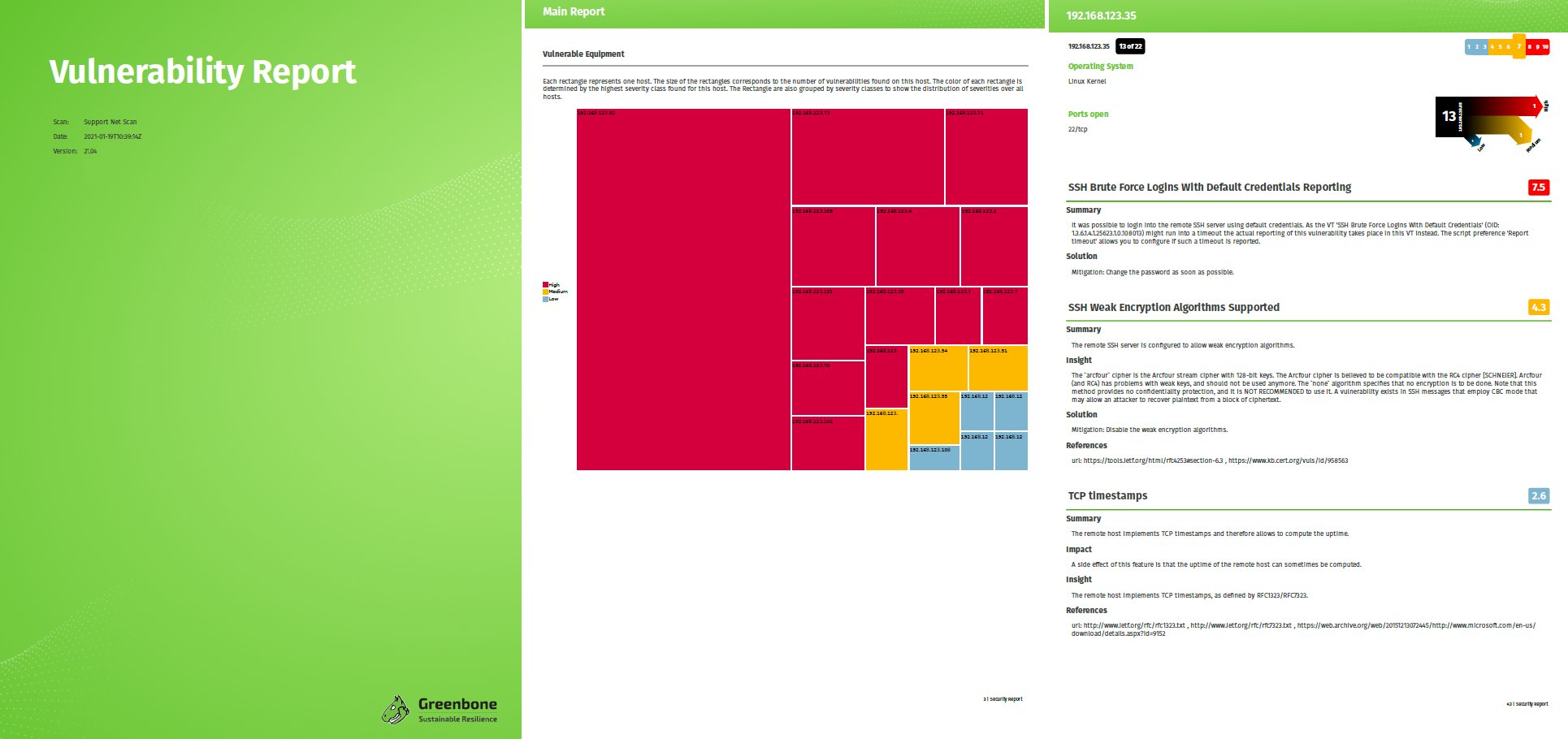
Two additional report formats are now available for exporting reports, replacing the previous standard report formats: Vulnerability Report PDF and Vulnerability Report HTML. The report formats are clearly structured and easy to understand. Specific information relevant to the target group can be quickly identified and understood.

The report formats provide a basis for user-defined reports, which are planned for future GOS versions.


New Network Backend for a more Stable Connection

With GOS 21.04, the network configuration backend in GOS has been improved by introducing the gnm networking mode. This prevents connection losses in certain network configurations as well as connection problems with SSH sessions. In addition, the GSM no longer needs to be restarted after certain network settings have been changed.

New Hypervisors for Our Virtual Appliances

The officially supported hypervisors for the virtual appliances have been changed with GOS 21.04. The GSM EXA/PETA/TERA/DECA and 25V can be used with Microsoft Hyper-V, VMware vSphere Hypervisor (ESXi), and Huawei FusionCompute; the GSM CENO can be used with Microsoft Hyper-V and VMware vSphere Hypervisor (ESXi); and the GSM ONE can be used with Oracle VirtualBox, VMware Workstation Pro, and VMware Workstation Player. Additionally, GOS 21.04 supports the ARM instruction set on Huawei FusionCompute.

Improvement of the Web Server, Ciphers and Web Certificates

With GOS 21.04, the nginx web server is used in addition to the Greenbone Security Assistant Daemon (gsad). This web server uses OpenSSL instead of GnuTLS to define the available ciphers and protocols of the server. There is now a new menu in the GOS administration menu for configuring the TLS version. In addition, the menu for configuring the ciphers has been adapted.

Another change can be found in the generation of HTTPS certificates. Here it is now possible to define one or more Subject Alternative Name(s) (SAN). These are used to cover multiple domain names and IP addresses with one certificate.

CVSS v3.0/v3.1 Support for Severity Calculation

CVSS version 3.0 and 3.1 are now supported for calculating the severity of CVEs (Common Vulnerability Enumeration).

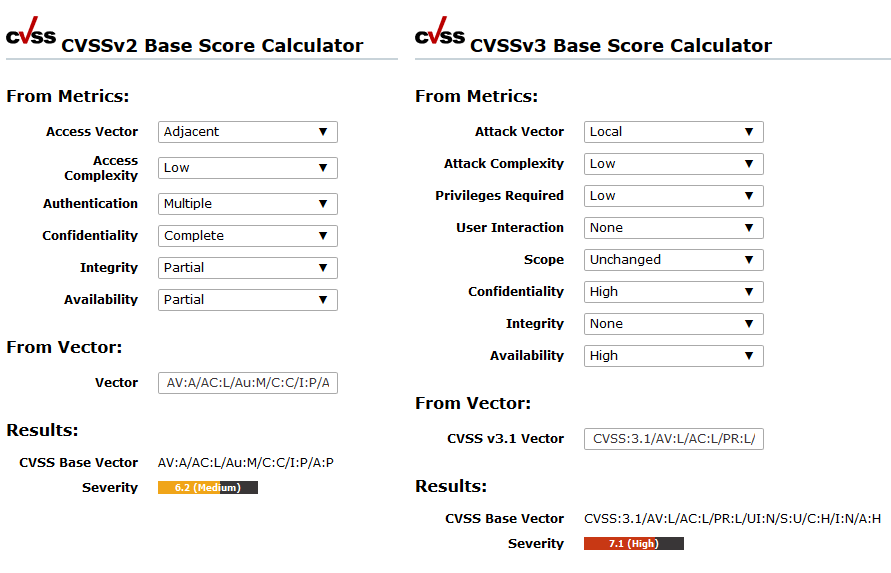
VTs and CVEs can contain version 2 and/or version 3.0/3.1 CVSS data. If a VT/CVE contains both CVSS v2 data and CVSS v3.0/v3.1 data, the CVSS v3.0/v3.1 data is always used and displayed.

The page CVSS Calculator now contains both a calculator for CVSS v2 and a calculator for CVSS v3.0/v3.1.

Open Scanner Protocol Makes all Sensor GSMs Lightweighted

Already with GOS 20.08 it was optionally possible for all sensors to be controlled via the Open Scanner Protocol (OSP). This results in the sensors becoming lightweighted and avoids the need for additional credentials on the sensor.

With GOS 21.04, only OSP is now used as the protocol to control a sensor GSM via a master GSM. The Greenbone Management Protocol (GMP) is no longer used.

Simplified and More Intuitive Functions on the Web Interface

With GOS 21.04, some minor changes have also been made to GOS and the web interface to make GSM operation and scanning clearer and more intuitive.

For example, the Auto-FP function and the alternative severity class schemes – BSI Vulnerability Traffic Light and PCI-DSS – have been removed.

Some devices – especially IoT devices – can crash when scanned across multiple IP addresses simultaneously. This can happen, for example, if the device is connected over IPv4 and IPv6. With GOS 21.04, it is possible to avoid scanning over multiple IP addresses at the same time by using the new setting Allow simultaneous scanning via multiple IPs when creating a target.

See for Yourself!

Check out our new features and changes for yourself! New appliances with GOS 21.04 are now available and existing appliances can also be upgraded to the latest version. Also our free trial version can be used with GOS 21.04.